Advertisement

Advertisement
powered by

Advertisements cue

Sunday, 25 December 2016

*99# USSD Banking

*99# – Just Dail & Get Any Information Your Bank Account Details.(Full Guidelines):-

                                        Hello Guys Today I Am Sharing This Awesome Trick  To Just Dail *99# – You are just Dail This Number & Get Your All Bank Details Or Facilitys In Your Mobile . Just Like Your Mini Statement Or Mini Transfer , Your All Account Details.USSD Based Mobile Banking, Check Bank Account Balance Offline, *99# USSD Mobile Based Banking, Mini statement and more without internet connectivity. India is gradually moving towards becoming a cashless economy, and the recent demonetization of old currency is serving as a catalyst in achieving PM Narendra Modi’s dream of Digital India.

Hindi (*99*22#)
Marathi (*99*28#)
Bengali (*99*29#)
Punjabi (*99*30#)
Kannada (*99*26#)
Gujarati (*99*27#)
Tamil (*99*23#)
Telugu (*99*24#)
Malayalam (*99*25#)
Oriya (*99*32#)
Assamese (*99*31#).

USSD banking daily transaction limit and charges:-


                                        According to the Reserve Bank of India (RBI), the USSD Based Mobile Banking pa yment method can be used for sending money as low as Re 1, and as much as Rs 5,000 per transaction. Coming to charges, you will be charged Rs 0.50 per transaction, which will be added in your mobile bill. The service works 24 hours a day and 7 days a week. However, carriers have waived off the transaction charges till December 31.

Getting started with USSD Based Mobile Banking:-


                                        First and foremost, you need a phone, a bank account and your mobile number registered for mobile banking. In case your phone number isn’t registered with your bank, you’ll have to visit the branch and fill-up a form to register and link it with your bank account. Once that is done, you’ll have to generate Mobile Money Identifier (MMID) number. It is a random seven-digit number issued by the bank. The MMID is usually sent to you by the bank after you register for mobile banking.

How to use USSD Based Mobile Banking codes:-


First Of all open the dialer app on your phone, type *99# and dial.
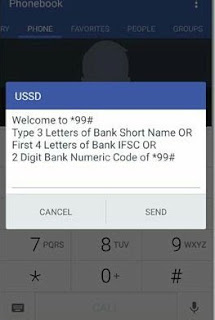

GPU will see the welcome screen after which you will have to enter first three letters, or IFSC code or 2-digit bank code followed by send.
  • For State Bank of India Type SBI
  • Forr ICICI Bank it will be ICI
  • for HDFC Bank it will be HDFC

How to transfer money using USSD Based Mobile Banking Codes:-


                                            In this example, I’ve used HDFC bank account to send money to my colleague using his MMID number. So, let’s see how to go about it.

Step 1: Dial *99#, type bank name, and when the interface opens, enter 3’ and tap send.


Step 2: Enter beneficiary mobile number


Step 3: Enter beneficiary MMID, which you will have to get from the person you are sending money to.


Step 4: Next, you need to enter amount and remarks (separated by space). For instance, I transferred Rs 5 to test how this works, so it looks like “5 Test”


Step 5: In the final step, you have to enter your MPIN to authorize the transaction and last 4 digits of your account number (separated by space), and tap on send. That’s it, once your transaction is authorized, the money will be instantly credited to the recipients account.


USSD Based Mobile Banking limitations:-


While the service does enable non-smartphone and non-internet users to send money using their phones, it is quite a tedious process. To begin with, once the USSD popup notification arrives, you have to respond within 10 seconds, or the process will get cancelled. When I was testing, I struggled to reach to step five as it would often throw an error saying External application down.’ It gets quite annoying as you have to start over again, and again at such times. Having said that, the service still seems in its nascent stages and improvements could be expected going forward


THANKYOU FOR VISITING OUR BLOG,PLEASE STAY TUNED TO KZCTRICKS

Monday, 12 December 2016

(STILL WORKING) Rs.50 free recharge,from MOBILEWALLET APP,(Only for New User)

(STILL WORKING)Mobile Wallet App,Offers Rs.50 free recharge on recharge of 50 or more (Only for New User)

(open the app fill the details<proceed to recharge or bill payment fot the amount 51 or more< apply promocode SCAN2PAY<50/- will be reduced and pay additional money)


Steps To be followed to get 50/- Recharge:-


  1. Firstly, Download Mobile Wallet App- CLICK HERE (if the link is not respond you can also download directly from playstore)
  2. Install The App and Click On Launch.
  3. Click on Signup to create new account.
  4. Apply Refer code –  003AIUAT
  5. After Signup, Login with your details
  6. Now Recharge with Rs.51 or more for any number (Amount Must Be greater than Rs.50 to get reduction of 50/-)
  7. Enter Promo code – SCAN2PAY 
  8. You will get Rs.50 off on your transaction
  9. Just Pay the rest amount (if your debit card transaction is showing error,Use Net banking  or another debit card credentials at time of Payment)


Terms & Conditions:-

  1. Only Valid for new users (once per mobile/user/dc/cc).
  2. Offer is also valid for Airtel recharges.
  3. Minimum Transaction amount Rs.51.
  4. Apply code SCAN2PAY to avail the reduction.

proof:-


THANKYOU FOR VISITING OUR BLOG,PLEASE STAY TUNED TO KZCTRICKS


Nova NHT1045W Beard Trimmer (White) At Just Rs.49/-

Nova NHT1045W Beard Trimmer (White) At Just Rs.49/-


STEPS TO BE FOLLOWED:-

  1. Visit Snapdeal Website Offer Page:-CLICK HERE
  2. Login to your Account and add the product to your cart.
  3. And proceed to checkout.
  4. Enter your shipping details.
  5. On Payment page select Freecharge as payment mode(it is mandetory to pay through freecharge wallet money not through debit or credit card so as to get 200/- cashback).
  6. Pay the Full amount via FeeCharge wallet Only.(if you didnt have money in freecharge wallet first add money to freecharge wallet and then pay for your order).
  7. You will get Rs.200 cashback in your Freecharge wallet after the  product delivery.
  8. so that you can get Nova Trimmer Worth Rs.249 at Just Rs.49 Because you will get 200/- cashback in your Freecharge wallet.
  9. Have a nice day!!!
  10. you will get cashback only when you pay total amount through freecharge wallet
    THANKYOU FOR VISITING OUR BLOG,PLEASE BE STAY TUNED TO 
    KZCTRICKS


Refer Friends & Get Rs.5000 in Bank

YOU CAN GET 5000/- TO UOUR BANK ACCOUNT

STEPS TO BE FOLLOWED:-

  • Download uc news app UC NEWS APP
  • install it & open app
  • select your preferred and also select any category
  • App will redirect to Dashboard. and You will see a Banner Like Below on dashboard


  • Open That Banner and Wait for Sometime .
  • Finally Page will Open and You will able to see ENTER CODE on the bottum of the page.
  • Enter given refer code to active your account:-
 2387471

  • You will see invite button on dashboard and COLLECTX1.click onCOLLECTX1 button and you will get lucky amount.
  • When your friendUse Your Refer code To Join than You will able to See COLLECT Button. Click on Button to Redeem Your Money. You will get Approx Rs.163 Per Refer.
  •  When You will Reach at Rs.5000 and Your Progress bar Will be at 100% then you can Redeem your Money in Bank.

TERMS & CONDITIONS:-

  • Contest will Run From 12 December 2016 to 16th December 2016Click “Start” for your reference code to start contest.
  • You can draw for credits(1~2500)as every time your friends enter your reference code.   Once your credits reached 5000,then you can claim Rs.5000 cash. 
  • UC will transfer Rs.5000 into winner’s bank account once all correct info been submitted before 31th Jan. 2017.
  • Participant need to launch UC News to claim prize Rs.5000 — No winners limitation (Maximum once for each participant)(Extra 2000~2500 credits will be given in UC News)..


PRIZE:-
  • For winner, please ensure that your contact info is correct. UC is not responsible for wrong delivery of prize.
  • Winners should consult the prizes before 31th Dec. 2016.
  •  In case participant fill in contact information many times, UC will use the latest information as the final one.UC will not release participant’s personal information to any third party
  • Any question or suggestion, please report it by clicking “Feedback” button
  • User are not encouraged to play the game for prizes with more than 1 phone. If UC find out that 1 person use 2 account to play, UC has right not to deliver prizes & Amount.


Thankyou For Visiting Our Blog,Please Be Stay Tuned To 


Sunday, 11 December 2016

Install paid apps free from playstore VERY EASY METHOD

How to install paid apps free from playstore(easy method):-


steps to be followed:-


  • It is not available in play store. so, download it from the link Appvn and install it on your Android mobiles and tablets eas  

  • stalling app,it will ask for update click on update,after updating click on install...
  • Then after it asks to uninstall old version,as new version is already downloaded. uninstall old version and enjoy new version.

  • Now Search For Your Favorite Paid Android App As For Example We’ve Selected Mx Player Pro App As Shown In Below Image.


  • After Searching Your Favourite Android App On Play store Go Down To The Page And Find These Buttons As Shown Like Below Image.


  • After Finding Above Buttons Click On Middle Share Button After Clicking on Middle Share Button It Will Open a Popup Like Below Image.


  • Just After Getting Popup Click On Share With AppVn App And That’s It You Will Get Free Download Page Of This App As We’ve Shown In Below Image.


  • That’s It You’ve Successfully Downloaded You Paid Android App For Free And With A Legal And Best Method.

(some of the apps,may not available.but maximum number of apps can be installed through this app)


Thank you for being visitor of our site,plz be stay tuned to kzctricks


Trick To Buy 16GB Pen drive @99/-


steps to buy thoshiba 16GB pendrive @ 99:- 

  • firstly visit snapdeal offer page here, https://goo.gl/6KF5aX
  • Login/Signup and add the product to your cart
  • Now Review your cart and proceed to checkout
  • Select or Update your shipping details
  • On Payment page select Freecharge as payment mode
  • Pay the Full amount via FeeCharge wallet
  • You will get Rs.200 cashback in your Freecharge wallet from the date of product delivery.
  • So, You got Toshiba 16 GB Pendrive Worth Rs.299 at Just Rs.99 Because you will get cashback in your Freecharge wallet.
  • Enjoy!!have a nive day


(currently it is in out of stock)


Thank you for being visitor of our site,plz be stay tuned to kzctricks


Get Flat 100% Cashback 


HOW TO REDEEM:-

  • Load money in your FreeCharge wallet
  • Transact at any of the list of partnered merchants(No minimum transaction amount & No promocode required)
  • Get 100% cashback, Max Rs.100 twice per user at any partner merchant i.e. Maximum 2 cashbacks per user

MERCHANT T&C:-

  • Get 100% cashback, Max Rs.100 twice per user
  • Offer valid from 11th December till 12th December 2016
  • Offer not valid on payments using QR code/ Send money option
  • Offer not valid on Tapzo(Helpchat) and IRCTC
  • User will still be eligible for any cashback offers prevailing on online merchants for later transactions
  • Cashback will be credited to FreeCharge wallet within 24 hours
  • The entire invoice value has to be settled using FreeCharge Wallet, partial payment not allowed
  • In case of order cancellation / refund, the full cashback amount will be deducted from the total refund due
  • The cashback amount will be calculated on the transaction value net of any refunds
  • Cashback amount will be in form of e-Voucher and valid for 6 months from the date of credit in FreeCharge account
  • In case of order cancellation, refund by FreeCharge Wallet will be processed within 7 to 10 working days
  • This offer is open to all FreeCharge Wallet Account holders whose accounts are valid and verified
  • The cashback offer is non-transferable, non-binding and non-encashable
  • Write in to care@freecharge.com for all issues/queries/complaints related to the offer
  • FreeCharge reserves the right to amend, modify, change, add or terminate (collectively change) the terms, contained herein at our sole discretion or withdraw this offer without any further notice
  • We reserve the right to restrict cashback from any account with suspicious behavior or invalid details/credentials.FreeCharge has the right to ask for documents to prove his/her identity

SNAP-DEAL T&C:-

  • Max Rs.200 cashback valid once per user on Snapdeal
  • Offer valid from 11th till 12th December 2016 23:59 PM
  • Offer is valid on products of all categories except Gift Cards, Jewellery, Movies, Recharges & Bill Payments and other Snapdeal Services
  • Cashback will be credited to FreeCharge wallet for shipped orders from 14 days of date of order
  • The entire order amount has to be paid using FreeCharge Wallet, partial payment or Cash on Delivery is not allowed
  • In case of order cancellation / refund, the full cashback amount will be deducted from the total refund due
  • The cashback amount will be calculated on the transaction value net of any refunds
  • Cashback amount will be in form of e-Voucher and valid for 6 months from the date of credit in FreeCharge account
  • In case of order cancellation, refund by FreeCharge Wallet will be processed within 7 to 10 working days
  • This offer is open for all valid & verified FreeCharge Wallet Account holders
  • The cashback offer is non-transferable, non-binding and non-encashable
  • FreeCharge reserves the right to amend, modify, change, add or terminate (collectively change) the terms, contained herein at our sole discretion or withdraw this offer without any further notice
  • We reserve the right to restrict cashback from any account with suspicious behavior or invalid details/credentials. FreeCharge has the right to ask for documents to prove his/her identity
  • For any queries, write to Snapdeal Customer Care

LIST OF MERCHANTS:-

  • McDonald's
  • CafĂ© coffee Day
  • Haldiram's
  • Barista
  • Travel Food Services
  • Cinepolis & Fun Cinemas
  • Vishal Mega Mart
  • Heritage Fresh
  • Hypercity
  • Crossword
  • MK Retail
  • HP Petrol Pumps
  • Viveks
  • ABHIBUS
  • Blue Book
  • Book my show
  • Bookyourgym Fitness private limited
  • Bus india
  • Clear trip
  • DailyHunt
  • Dine out
  • Dominos
  • Driveu
  • Explara
  • Flaberry
  • Foodpanda
  • FreshMenu
  • Fun cinemas
  • Gaana
  • Goibibo
  • Hungama
  • Industry Buying
  • Inner chef
  • Jabong
  • Jugnoo
  • Limetray
  • Lite Bite Foods Pvt Ltd
  • Magic Bus India Foundation
  • Magzter
  • Mera Events
  • MERU CAB Campany Limited
  • Mybusticket
  • oyo
  • Printo Document Services
  • Print Venue
  • Rapido
  • Repear Shop
  • Redbus
  • Ridlr-Metro
  • SaleBhai
  • Shuttl
  • Swiggy
  • Ticketnew
  • Travelyaari
  • Utoo cabs
  • Viveks Pvt Ltd
  • Viu
  • Voonik
  • Yepme
  • Zimmber
  • Zivame
  • Zomato
  • Zoomin


Thank you for being visitor of our site,plz be stay tuned to kzctricks